How to Redeem War of Circles Codes
Evergreen redemption steps for when Vessel Game finally drops a real promo string.
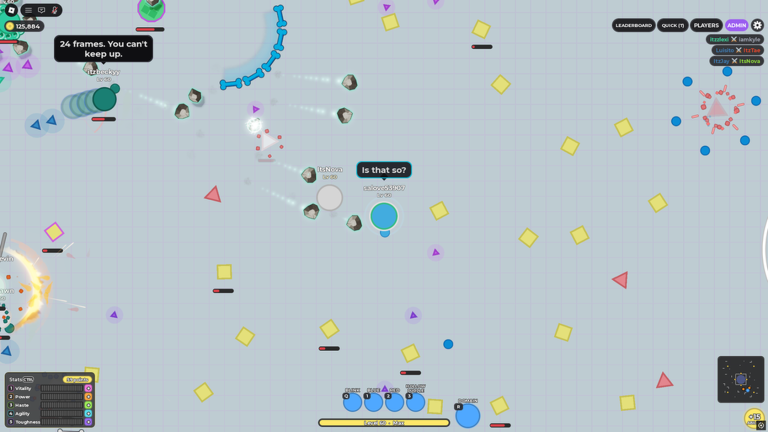
Promo codes in War of Circles are optional bonuses on top of the arena loop — not a required progression gate. As of November 2026, this wiki still has no verified active codes. That does not mean you should skip learning the redeem flow. When Vessel Game (Vessel_Holder) ships a drop after a milestone, holiday, or content patch, the players who already know where the UI lives claim first and get back into matches faster.
This page is the evergreen how-to. Pair it with the live status table on the codes hub, the timeline spine on updates, and the first-hour plan in getting started. Official place and group URLs sit on the wiki links page. If someone tries to sell you an executor that “auto-redeems,” stop and read the safety notes on scripts instead.
What a redeemable code usually looks like
Roblox experience codes are short text strings. They may be all caps, mixed case, or include numbers. They almost never need punctuation beyond letters and digits. Treat anything that asks you to paste a long URL, download a file, or enter a password as a scam — that is not how War of Circles rewards work.
Legitimate announcements tend to appear in:
- Vessel Game group shouts (community
42558433) - The official Roblox place description or update post for War of Circles
- Occasional creator mirrors that copy the official string exactly
Cross-check the spelling against an official channel before you burn attempts. The codes hub only adds a row after in-game confirmation. Until then, keep the table empty on purpose.
Step-by-step redeem flow
Exact button labels can move after UI patches, so hunt by meaning rather than memorizing one icon forever. When a code exists, the usual loop is:
- Join the official War of Circles place from wiki links — avoid clones with similar thumbnails.
- Wait until your circle, HUD, and lobby or arena UI fully load. Redeeming mid-teleport often fails silently.
- Scan the HUD for a Codes, Rewards, Gift, Twitter/X, or Social entry. Shop panels and settings gears are common hiding spots in Roblox arenas.
- Open the field, clear any placeholder text, and paste the string exactly as announced.
- Confirm. Watch for a success toast, inventory bump, currency tick, or mail/claim popup.
- If nothing happens, leave the experience and rejoin once, then try again with the same exact spelling.
Do not mash the submit button ten times in a row. Many systems rate-limit or treat duplicate submits as already claimed even when the first press never registered.
UI hunt tips after patches
War of Circles is a live arena with Domains, 39 classes, and hundreds of upgrades. Vessel Game can reshuffle menus when the Roblox listing shows an [UPD] style title marker or when combat systems change. After any noticeable UI refresh:
- Re-open shop, settings, and any bird/social icon before assuming codes were removed.
- Check lobby tip banners — some experiences surface redeem hints there after a drop.
- Recheck updates and the patch checklist so you are not hunting a button that moved during a balance pass.
- Keep mobile and PC layouts in mind; the codes entry may sit in a different corner on touch UI.
If the experience truly has no redeem UI yet, that matches a no-codes season. Do not install third-party overlays that claim to inject a code box.
Case sensitivity, spaces, and common failures
Most Roblox code fields are case-sensitive. A string like SummerDrop fails if you type summerdrop. Leading or trailing spaces from a messy copy-paste are the number one soft fail. Newline characters from mobile share sheets are a close second.
When a redeem fails, work this short list before blaming the game:
- Trim spaces; paste into Notepad first if needed.
- Match letter case to the official announcement.
- Confirm you are on the right Roblox account — rewards are almost always account-bound.
- Confirm the code was not already claimed on that account.
- Confirm the drop has not expired after an event window.
- Rejoin once to refresh session state.
Expired codes and mistyped codes often share the same generic error. Without an official expiry note, assume event codes die quietly after the campaign ends. Recheck the codes hub instead of trusting undated screenshots.
What codes will not fix
Even a generous future reward will not teach Domain timing, upgrade sequencing, or how to survive a 16-player lobby. Codes usually grant cosmetics, small currency, boosts, or starter materials. They do not replace fundamentals:
- Positioning and first-match goals still come from getting started and how to play.
- Spend plans still come from upgrades.
- Burst windows still come from Domain Expansions.
- Archetype choice still comes from best class and the tier list.
If your deaths are from standing in every Domain, no promo string will save you. Bank the reward, then queue with a plan.
Safety rules while hunting codes
- Redeem only inside the official experience.
- Never download “code generators,” browser extensions, or executables that promise free Domains or class unlocks.
- Never type your Roblox password into a fake redeem site.
- Treat random Discord pastes and edited screenshots as unverified until they match Vessel Game or this wiki’s confirmed table.
- If automation chatter spikes after a drop, read scripts before you touch any tool.
Account theft patterns love code season. Skepticism is part of the redeem skill.
After a successful redeem
- Note what you received so you do not re-spend the same currency twice.
- Fold any boost into a clean early tree — survivability, then your primary damage path (upgrades).
- Skim updates in case the drop landed with a combat change.
- Return to the codes hub later to see whether the wiki marked the string expired.
Session checklist
- Open codes for verified rows (may still be empty).
- Check Vessel Game group shouts and the place description via wiki.
- Join the official place and hunt the Codes / Rewards UI.
- Paste exactly; trim spaces; respect case.
- On failure, rejoin once, then stop spamming.
- On success, bank the reward and play with intent — not with leftover FOMO.
Learning this flow once means the next Vessel Game drop costs you thirty seconds instead of a whole evening of scam links. Until a real string appears, put your time into classes, Domains, and upgrades — that is what actually wins arenas in War of Circles.
Frequently Asked Questions
Quick answers for War of Circles on Roblox.
Are there War of Circles codes to redeem right now?
As of November 2026, no promo codes have been verified. Use this page to learn the flow, and watch the codes hub for the first confirmed rows.
Where is the redeem button in War of Circles?
Look for Codes, Rewards, Gift, Social, or a Twitter/X style entry on the HUD after full load-in. Shop and settings panels are common locations; labels can move after UI patches.
Do codes care about capital letters?
Usually yes. Paste the string exactly as Vessel Game announced it, with no extra spaces or line breaks.
Will a code fix my win rate?
No. Rewards are bonuses. Fundamentals still live in getting started, upgrades, and Domain timing guides.
Is it safe to use a website that claims to redeem for me?
No. Redeem only in the official experience. Generators and third-party redeem sites are common account-theft patterns — see scripts for related warnings.